KNIME · Software · YoctoIT tech page

GenAI nodes

The nodes for working with the language models: RAG and AI automations inside the workflows — the LLM like any other node.

FOCUS · THE LLM IN THE FLOWPrompts, embeddings and vector stores as nodes: GenAI automations without writing code
YoctoIT material for clients and partners · KNIME and the products mentioned are trademarks of KNIME AG.
01 · What it is

GenAI & LLM nodes, made clear.

KNIME's AI extension treats the language models as nodes: connectors for OpenAI, Azure, local models (Ollama/GPT4All), nodes for prompts over whole tables, embeddings and vector stores for the RAG. The GenAI automation — classify these thousand tickets, extract the fields from these invoices — gets built by dragging.

A tabelle
the prompt applied to a thousand rows: GenAI in batch, governed
RAG as nodes
embeddings + vector store + retrieval: the visual 'ask your documents'
Locale
Ollama and in-house models: GenAI even without the cloud
GenAI & LLM nodes
OFFICIAL KNIME BRANDING · GENAI NODES
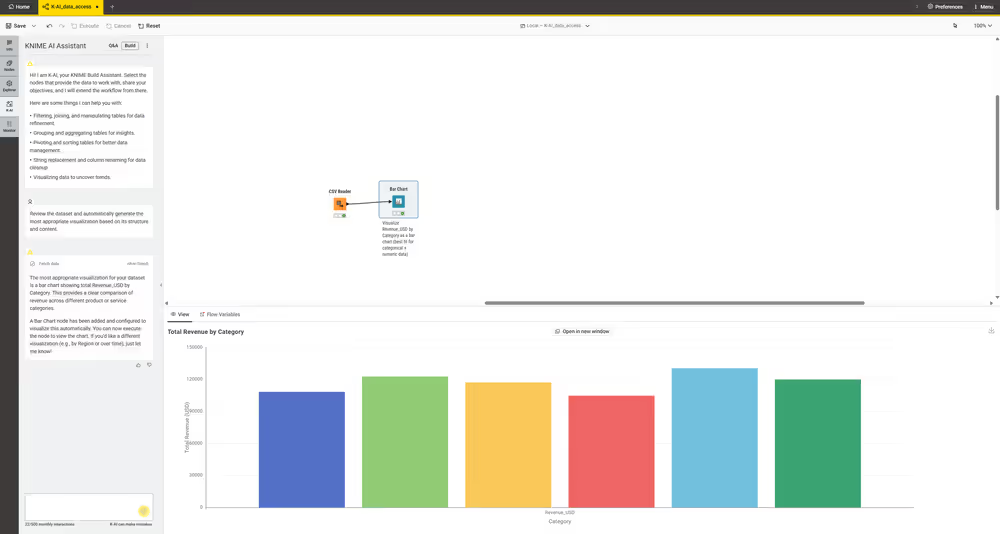
INTERFACCIA REALE · K-AI COSTRUISCE IL WORKFLOW · FONTE: KNIME DOCS
REAL INTERFACE · K-AI BUILDS THE WORKFLOW · SOURCE: KNIME DOCS
02 · How to use it well

The things that make the difference.

The GenAI toolbox

The use caseclassify, extract, summarize
LLM connectors
Prompts over columns
Embeddings & RAG
the model · the scale · the context
Evaluation in the flowthe quality measured, always
Cloud or on-premthe model for the constraints
GenAI with the workflow's discipline

The governed batch

A thousand documents processed with logs, costs and retries: GenAI as a process, not as a chat.

Evaluation in the flow

Verified samples and quality metrics: the AI output checked like every piece of data.

RAG on the in-house documents

Manuals and contracts queryable: the index built in the workflow, the permissions respected.

Costs per execution

Tokens counted and the right model per task: the AI on the bill, under control.

03 · In depth

GenAI in the flows: prompts, RAG and agents as nodes

The AI extension brings the LLMs into the workflows: the nodes connect the providers (OpenAI, Azure, Anthropic, local models via Ollama/GPT4All), the prompts get built with the flow's data (the row becomes context), the RAG gets assembled as nodes (embeddings, vector store, retrieval), the agents orchestrate tools and decisions; the value: AI INSIDE the existing data pipeline — classifying tickets, enriching master data, extracting from documents — with the Hub's governance.

  • Multi-provider — OpenAI, Azure, Anthropic or the local model: you switch with a node
  • Modelli locali — Ollama and GGUF: GenAI without data outside the perimeter
  • RAG as nodes — visual embeddings, store and retrieval: the explainable RAG
  • Prompt dai dati — each row its own context: mass classification
  • Agenti — the LLMs using tools within the flow's limits: the control stays
  • Governance Hub — who uses which model, with what data: the AI tracked
04 · Numbers and lifecycle

The numbers that matter.

0
code for the first GenAI case
locale
the option for the sensitive data
audit
every LLM call traceable in the flow
giorni
the PoC on a real case
Useful GenAI lives in the processes: the right use case, the right model, the guardrails — as nodes, with us.
05 · Use cases

Where it really pays off.

Document classification

Tickets, emails and invoices sorted by the LLM.

Data extraction

The fields from the PDFs to the table, in flow.

Data enrichment

Descriptions and categories generated at scale.

GenAI pays off when it's a repeatable process: in the workflow it is — with the controls as standard.