Citrix · Infrastruttura · YoctoIT tech page

HDX

The protocol that makes the difference: a smooth experience even on difficult networks — video, peripherals and 3D included.

FOCUS · THE EXPERIENCE IS THE PROTOCOLAdaptive transport, multimedia offload and 3D: the remote desktop that doesn't feel remote
YoctoIT material for clients and partners · Citrix, NetScaler, HDX and the other products mentioned are trademarks of Cloud Software Group, Inc.
01 · What it is

HDX, made clear.

VDI is decided on the experience, and the experience is HDX: the adaptive transport (EDT) that makes even the train's network smooth, the Teams and video offload (the call runs on the client, not in the data center), the 3D support for CAD, and the peripherals — printers, signature pads, scanners — that work like local.

EDT
the adaptive transport: smooth on the LAN, resilient on bad networks
Teams offload
the call optimized on the client: the data center doesn't play switchboard
3DPro
GPUs and CAD in session: the remote workstation for real
HDX
OFFICIAL CITRIX BRANDING · HDX
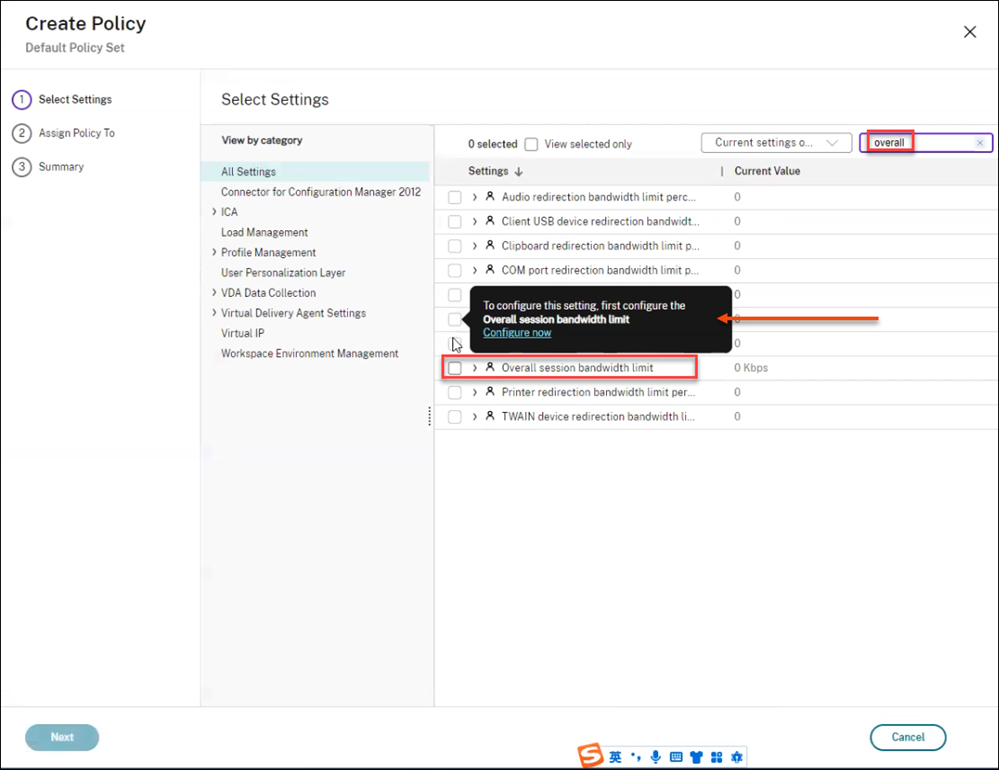
CONSOLE REALE · POLICY HDX · FONTE: CITRIX DOCS
REAL CONSOLE · HDX POLICIES · SOURCE: CITRIX DOCS
02 · How to use it well

The things that make the difference.

The pixel's journey

The client (everywhere)PCs, thin clients, tablets
Adaptive EDT/TCP
Codecs & offload
Peripheral channels
transport · rendering · devices
HDX policiesthe quality governed per group
The session in the DCwhere the work really runs
The distance you don't feel

Policies per population

The CAD designer and the data operator have opposite needs: HDX policies per group, not one-size-fits-all.

Multimedia with judgment

Teams/browser offload where it fits, transcoding where needed: the bandwidth well spent.

Mapped peripherals

Printing, graphometric signature, scanners: the special cases tested before the rollout.

Measured, not perceived

Session latency and ICE RTT in the reports: the experience with numbers (uberAgent helps).

03 · In depth

The protocol: adaptive, multimedia, frugal

HDX is the experience's engine: the adaptive transport (EDT over UDP with TCP fallback) keeps the session smooth even on bad networks, the adaptive throughput doses the bandwidth, the codecs (H.264/H.265/AV1 selective per region) balance quality and CPU, the multimedia offload (Teams/Zoom optimization) takes the audio/video out of the datacenter, the session watermark and the clipboard/drive mapping policies govern the channel's security.

  • EDT — the UDP transport that forgives the network: the branch on 4G works
  • Codec adattivi — H.265/AV1 where needed, lossless text where it counts: quality and bandwidth together
  • Teams optimization — the AV peer-to-peer from the client: the datacenter doesn't play switchboard
  • 3D Pro — the vGPUs for CAD: the remote graphics workstation
  • Policy di canale — clipboard, USB, drives: every flow governed by policy
  • Session reliability — the session that survives the network holes: it reattaches by itself
04 · Numbers and lifecycle

The numbers that matter.

~100ms
the latency up to which the experience stays full
-50%
the bandwidth with the modern codecs at the same quality
60fps
professional remote 3D with vGPU
0
media servers: Teams and Zoom offloaded to the client
The user experience is tuning: HDX policies, codecs and QoS tuned by us — the VDI you don't feel.
05 · Use cases

Where it really pays off.

Serious remote working

The full office even from the home network.

Remote CAD & graphics

The workstation in the data center, the designer anywhere.

Difficult networks

Construction sites, ships, foreign branches: HDX holds.

If the user feels the distance, the VDI has failed: well-tuned HDX isn't felt — that's our trade.